
How to keep your Russian phone number abroad without losing access to services
After moving abroad, it’s easy to overlook something simple: your Russian phone number isn’t just for calls. It’s the key to your banks, Gosuslugi (Russia’s government services portal), the tax service, marketplaces and almost everything else you left behind in Russia. Lose the number, and getting your access back will be much harder than you might think.
Below we look at what exactly stops working without the number, how to keep it from another country, why your mobile carrier’s online account won’t open, and what to do if you’ve already lost the number.
Why your number matters more than you think
Almost every Russian service ties sign-in to your phone number specifically, not to your email. The verification code arrives by SMS, password recovery goes through the same number, and sometimes the number doubles as your login.
That creates a chain: no number, no code, no sign-in. It doesn’t matter that you remember your password and know the answer to your security question — the system will still ask for confirmation.
What stops working without your number
| Service | What happens |
|---|---|
| Bank | You can’t sign in to the app, confirm a transfer or get a replacement card |
| Gosuslugi | You can’t sign in or recover your password — the number is your login |
| Tax service, Moy Nalog (“My Tax”) app | You usually sign in through Gosuslugi, so you’re locked out here too |
| Marketplaces | You can’t confirm a sign-in, place an order or dispute a return |
| Email and messaging apps | Accounts tied to the number may become permanently inaccessible |
There’s one more catch: if a number goes unused for a long time, the carrier has the right to disconnect it and later give it to someone else. Then you won’t be able to recover the accounts tied to it at all — the code will go to the new owner.
Two numbers: a local one and a Russian one
Almost everyone who has moved abroad ends up with the same setup: a local SIM for everyday life and a Russian number used only as a key to services. It’s a convenient split, and here’s why.
| Local number | Russian number | |
|---|---|---|
| What it’s for | Calls, mobile internet, local services | Verification codes from Russian services |
| What it costs | A regular local plan | The cheapest plan, often a nominal fee |
| How to keep it | The main SIM in your phone | An eSIM as a second profile, or a spare phone |
| What happens if you lose it | You can get a new one in a day | You lose access to your banks and Gosuslugi |
That last row is exactly why it’s not worth skimping on your Russian number: getting everything back will cost you far more than a year on the cheapest plan.
Why SMS messages don’t arrive even when your number is active
- The SIM card is sitting at home. This is the most common reason: if the card isn’t in a device, nobody receives the messages.
- No roaming. Receiving SMS abroad requires international roaming to be on — sometimes it has to be activated separately.
- Zero balance. If your balance goes negative, service is suspended, and that includes receiving messages.
- The number was disconnected for inactivity. If there has been no paid activity for six months, the carrier may terminate the contract.
How to keep your number from another country
There are several options, and they aren’t mutually exclusive.
- Keep the SIM card in a spare phone. The simplest option: an old phone with roaming turned on receives your SMS messages. The downside is roaming charges and having to keep the phone charged.
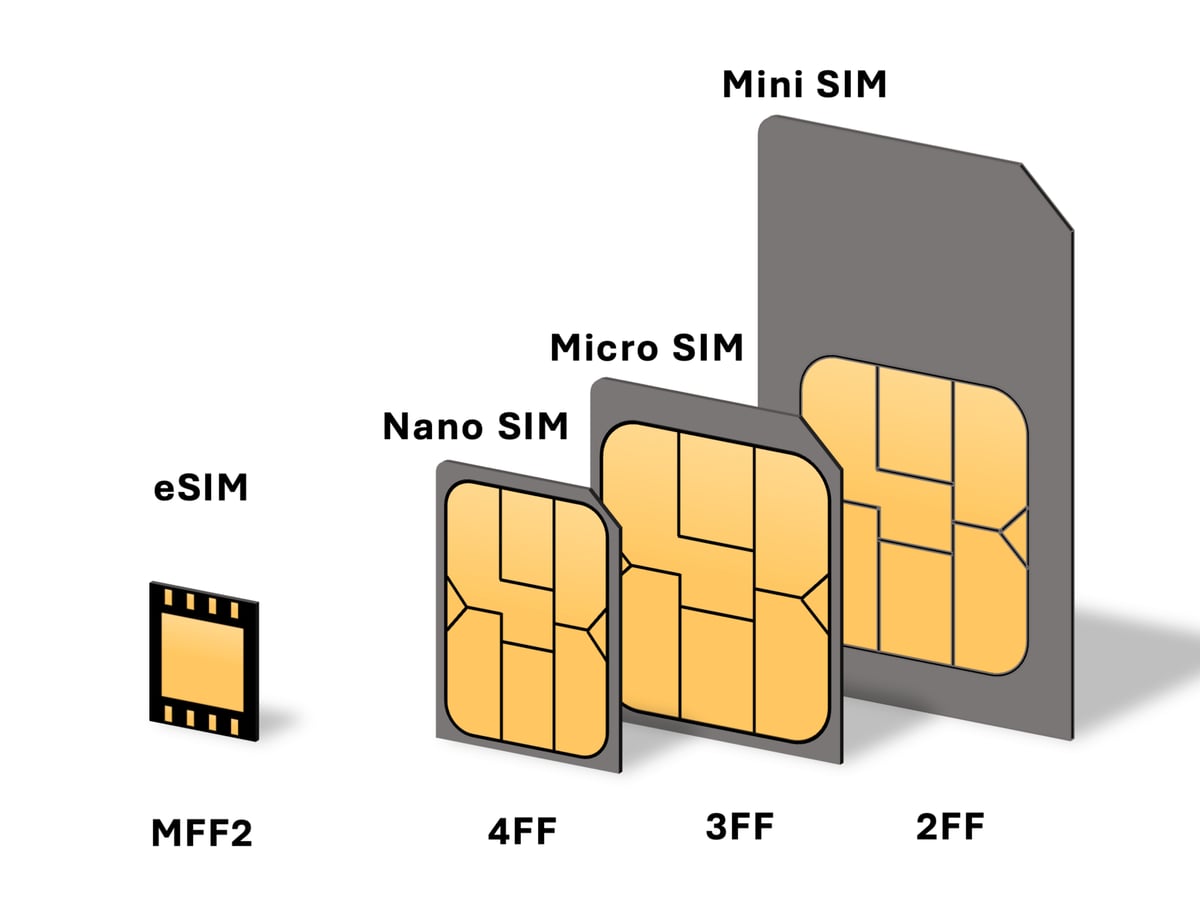
- Move the number to an eSIM. The virtual card lives right on your current phone as a second profile. The switch usually requires verification, so it’s easier to do before you leave.
- Leave the SIM card with someone you trust. This works, but you’ll have to ask them for every code. For regular transactions, that gets old fast.
- Set up SMS forwarding. Some carriers can forward messages to email or a messaging app. Check with support: not every carrier offers it, and not on every plan.
- Switch to a cheap plan. The cheapest plan, or an archived one “for people who rarely make calls,” will keep the number alive for little money.
The main thing is not to let the number get disconnected. All it takes is some paid activity on it and a positive balance. You can check this in your carrier’s online account — and that’s where the second problem comes in.
Your carrier’s online account won’t open either
To top up your balance, change your plan or set up an eSIM, you need your online account with your Russian carrier, whether that’s MTS, Beeline, MegaFon or T2 (Tele2). And it behaves like other Russian services: from a foreign IP address, it usually won’t open or won’t let you sign in.
It’s a vicious circle: to keep the number, you need the account; to sign in to the account, you need a code sent to that number; and the account itself won’t open because of the country you’re in. The way out is the same as in every similar situation — a Russian IP address. We explain how that works in a separate article: why you need a Russian IP address after moving abroad.
What exactly you need for this and how much it costs is covered on a separate page: how to get a Russian IP address.
Step by step: how to open your carrier’s online account
It takes about 5 minutes, and you don’t need a card: the first 7 days are free. The bot’s menus are in Russian, so button names are shown exactly as they appear on screen, with a translation.
Step 1. Get access in the Telegram bot
- Open the Liberum VPS bot and tap Start.
- Confirm that you agree to the terms.
- In the menu, tap 🔐 Тарифы / Подключить VPS (“Plans / Connect VPS”).
- Choose 🎁 Активировать TRIAL (7 дней) (“Activate TRIAL (7 days)”) — it’s free, and you don’t need to link a card.
- When the bot asks you to choose a location, tap 🇷🇺 Россия (“Russia”).
- In 10–15 seconds, you’ll receive a subscription link; you can also find it under 📱 Мои конфиги (“My configs”).
Step 2. Add the subscription to the app
We recommend Happ: it’s free and available on all platforms — iPhone and Mac, Android, Windows. For the Russian App Store, there’s Happ Lite.
- Copy the subscription link from 📱 Мои конфиги.
- Open Happ and tap + in the top right corner.
- Choose to add it from the clipboard.
- Select the location with the Russian flag.
- Tap the connect button, then open your carrier’s account.
Once you can get into your account, the rest is easy: top up your balance, switch to the cheapest plan, set up an eSIM or order an itemized statement.
What else opens up along with your carrier’s account
A Russian IP address isn’t only about your phone service — it also lifts the same restrictions, all at once, from the other services your number is tied to:
- Banks. Signing in to the app and confirming transactions — how to access SberBank Online and T-Bank (formerly Tinkoff) from abroad.
- Gosuslugi. Signing in, applications, powers of attorney — why the portal won’t open and how to fix it.
- Taxes. Your taxpayer account with the Federal Tax Service (FNS), the Moy Nalog app and Gosklyuch (Goskey), the government e-signature app — our guide to Russian taxes from abroad.
- Shopping. Orders for family back in Russia — using the Wildberries and Ozon marketplaces from abroad.
In other words, one subscription covers the whole set at once: your number, your bank, the government portal and online stores. You don’t need a separate fix for each service.
What to do if you’ve already lost your number
It’s an unpleasant situation, but not always a hopeless one.
- Check whether the number is still available. If the carrier hasn’t given it to another subscriber yet, the contract can sometimes be restored — usually at a carrier office or through a trusted representative with a power of attorney.
- Recover accounts by other means. Some services accept your email, passport details or a support request with proof of identity.
- Your bank: at a branch or through a power of attorney. Changing your number with a bank almost always requires proving your identity; it can rarely be done remotely.
- Gosuslugi: through an MFC (a one-stop government services center) or a partner bank. This, too, usually requires you or a trusted representative to be there in person.
That’s exactly why keeping your number is much cheaper than regaining access to the services tied to it later.
How to prepare in advance
Keeping your number when you move is far easier than regaining access to the banks and government services tied to it afterward. Here are five steps worth taking before you leave.
- Move your number to an eSIM or buy a cheap spare phone for the SIM card.
- Switch to the cheapest plan and put some extra money on your balance.
- Set up automatic top-ups from your card so your balance doesn’t go negative.
- Make sure this is the number listed with your bank and on Gosuslugi.
- Set up sign-in with biometrics or push notifications wherever possible — that way, you’ll depend less on SMS.
Key takeaways
- A Russian phone number is the key to banks, Gosuslugi, the tax service and marketplaces, not just a way to make calls.
- A number with no paid activity can be disconnected and given to someone else — and then the accounts tied to it can’t be recovered.
- An eSIM, a spare phone, the cheapest plan and automatic top-ups help you keep it.
- Your carrier’s online account usually won’t open from abroad — this is where a Russian IP address helps.
- You can find out whether this solves your problem during a free 7-day trial, with no card and no auto-renewal.
Get back into Russian services with LIBERUM VPN
A server in Russia and fast servers abroad in one subscription. The first 7 days are free, no card required.
Link won’t open? Search for @Liberum_VPSBot in Telegram.
Frequently asked questions
Can I get by without a Russian phone number at all?
Hardly. Russian banks, Gosuslugi and the tax service tie sign-in specifically to your phone number: the verification code arrives by SMS, and password recovery goes through the same number. Some services let you replace SMS with push notifications or biometrics, but you need to set that up while you still have access.
Will my number be disconnected if I don’t use it?
Yes. If there’s no paid activity on the number, the carrier has the right to terminate the contract and later reassign the number to another subscriber. To prevent this, keep a positive balance and stay on the cheapest plan — that’s usually enough.
Which is more convenient: an eSIM or a spare phone?
An eSIM is more convenient: the number lives as a second profile on your main phone, so there’s nothing extra to carry around or charge. But switching to an eSIM usually requires verification, so it’s easier to do before you leave. A spare phone is a workable backup option.
Why do I need a Russian IP address for my carrier’s online account?
The online accounts of MTS, Beeline, MegaFon and T2 behave like other Russian services: from a foreign IP address, they usually won’t open. And without the account, you can’t top up your balance, change your plan or set up an eSIM. It’s a vicious circle, and a Russian IP address is what breaks it.
Will I get SMS messages if I turn on a Russian IP address?
No. The IP address determines access to websites and apps, while SMS messages are delivered to your SIM card by the carrier. These are two separate jobs: the address opens your account, but the messages still arrive wherever the SIM with your number physically is.
My number has already been disconnected. What should I do?
First, check with your carrier whether it has been reassigned to another subscriber. If it hasn’t, the contract can sometimes be restored at a carrier office or through a trusted representative. After that, you’ll have to change the number with your bank and on Gosuslugi, which almost always requires an in-person visit — by you or a trusted representative.


